

WP PukiWiki
WP PukiWiki allows the WordPress author to write articles using a light-weight syntax, instead of HTML.
Plugin info
Maintenance & Compatibility
Maintenance score
Possibly abandoned • Last updated 6772 days ago
Is WP PukiWiki abandoned?
Possibly abandoned (last update 6772 days ago).
Compatibility
Similar & Alternatives
Explore plugins with similar tags, and compare key metrics like downloads, ratings, updates, support, and WP/PHP compatibility.
Description
PukiWiki is a PHP-based Wiki. PukiWiki features headings, quotations, lists of various types, preformatted texts, images, footnotes, hyperlinks, smileys, and many others.
WP PukiWiki allow the WordPress author to use PukiWiki-style Wiki syntax in writing posts and pages. The screenshots give you some idea. Visit the main site for more information.
Requirements
- Working PukiWiki system accessible from the Internet.
- WP PukiWiki: WP PukiWiki uses PHP’s Curl API. Turn it on if this feature is missing on your site.
Installation
- Setup
PukiWikiand make it accessible via http from your WordPress hosting server.PukiWikican be obtained from PukiWiki official site. If you already have a runningPukiWikiyou can use that site. WP PukiWiki uses a PukiWiki system to translate Wiki syntax to HTML but WP PukiWiki does not modify PukiWiki at all. Therefore, it is safe to use your existing PukiWiki system. - Obtain and unzip wp-pukiwiki.zip.
- Open
wp-pukiwiki.phpwith a text editor and modify the definition forWPPW_URLso that it points to the URL of yourPukiWikisite. - Upload the
wp-pukiwikifolder/directory to the/wp-content/plugins/directory of your WordPress hosting server. - Activate the plugin.
Frequently Asked Questions
You can find more information from the WP PukiWiki main site. It offers more detailed installation instructions, examples, manual, and more.
Review feed
Screenshots
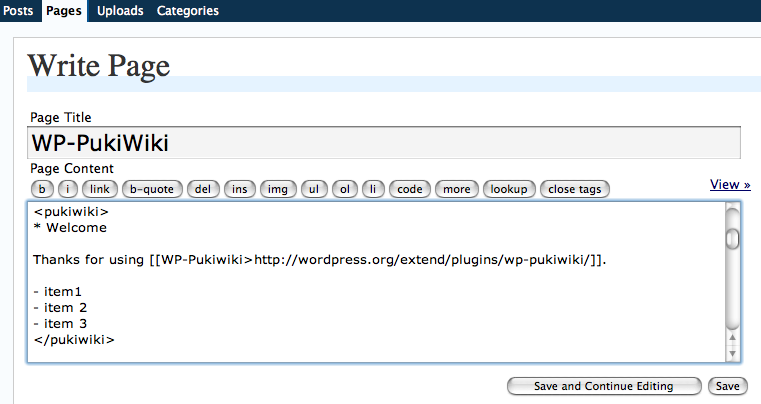
Make a region of your writing enclosed by pseudo pukiwiki tags (<pukiwiki> and </pukiwiki>) and you can use PukiWiki syntax in writing your documents.

Given the above example filled in the WordPress textfield, produced is this page view. Simple, isn't it?