

Plugin info
Maintenance & Compatibility
Maintenance score
Possibly abandoned • Last updated 2558 days ago
Is Custom Archives abandoned?
Possibly abandoned (last update 2558 days ago).
Compatibility
Developers
Similar & Alternatives
Explore plugins with similar tags, and compare key metrics like downloads, ratings, updates, support, and WP/PHP compatibility.
Description
Custom Archives lets you set the page of your choice as the archive page to any custom post type that uses archives. This provides you with flexibility allowing you to use a page with a custom template selected to display something different.
Developers
For information regarding the hooks and integrations in this plugin, refer to the wiki on the GitHub repository.
Thank You
Thanks go to Human Made who released Page for post type which was used as inspiration for building this plugin.
Installation
You must have at least one custom post type to use this plugin.
- Download, unzip and upload the package to your plugins directory.
- Log into the dashboard and activate within the plugins page.
- Go to Settings > Archives and configure your custom archive pages.
Frequently Asked Questions
Can I have a custom archive page for posts?
By default WordPress allows you to use a special page as a custom archive page for posts so you don’t need to use this plugin for that.
Why am I not seeing any options?
You need to have at least one custom post type on your site for this plugin to have any effect. The plugin won’t do anything otherwise.
What happens if I delete the page?
If you delete a page that is a custom archive page, it will automatically remove the setting and will safely default back to the standard archive page template.
Can the archive use the page permalink?
No, due to technical difficulties and user experience considerations, the custom archive page must use the original archive permalink.
Can I use a page for multiple archives?
No, this is not possible as the user is redirected to the original archive page link.
Review feed
Screenshots
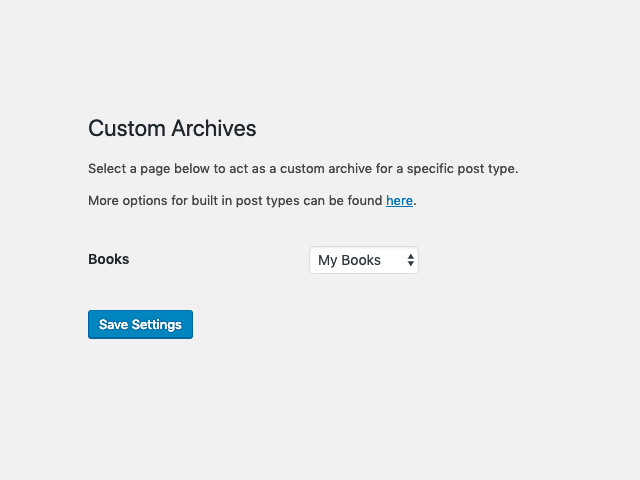
The custom archive settings page within the dashboard.

Viewing the custom archive page in the page list table.

Editing a custom archive page.
Changelog
Refer to the GitHub repository for information on version history.