

Mapp Intelligence
The plugin adds the Mapp Cloud Tag Integration code to your website and creates the data layer for your customer insights dashboards.
Plugin info
Maintenance & Compatibility
Maintenance score
Stale • Last updated 194 days ago
Is Mapp Intelligence abandoned?
Likely maintained (last update 194 days ago).
Compatibility
Similar & Alternatives
Explore plugins with similar tags, and compare key metrics like downloads, ratings, updates, support, and WP/PHP compatibility.
Description
The Mapp Cloud plugin enables customers to quickly and easily set up the tracking environment needed to start analysing customer insights immediately. It creates the data layer used to feed the Mapp Intelligence customer insights and Mapp Acquire dashboards without requiring you to touch any code.
Plugin Features
- Adds the Mapp Cloud Tag Integration code to the footer of your website.
- Creates the standard data layer to start analyzing customer insights immediately.
- Enables customers to
- add the information needed to initialize tracking.
- exclude unwanted keys/information from the data layer.
- exclude tracking of users logged in the WordPress admin panel.
Mapp Cloud
Mapp Cloud allows customers to gain in-depth customer insights and adjust marketing activities based on actual user behavior and data. Thanks to comprehensive first-party data and the tool capable of analysing mission-critical information, our customers can make data-driven decisions based on AI alerts and user-centric predictions.
Key Features
- Customer insights: Gain in-depth knowledge of your customers.
- Smart alerts: Get alerts if any anomaly is detected by the system.
- Purchase/Abandon predictions: Check the likelihood of your customers to churn or convert.
- Funnel and journey analysis: Follow your users and find the quickest path to conversion.
- Recommendation engine: Personalise your content for each individual user.
- Dashboards and reports: Use our easy-to-understand dashboards for an in-depth analysis.
- Integrate easily with all products to unlock the full potential of the Mapp Cloud
Find out more on our website
Installation
- Add the plugin to your admin panel.
- Add your Tag Integration ID /GTM ID. Leave the Tag Integration domain as is unless you host the tracking script on your own servers.
- Optionally, exclude keys from the datalayer.
- Optionally, exclude users logged into the WordPress admin panel from being tracked via the pixel.
- Optionally, add your Mapp Acquire script tag.
- Save the plugin in WordPress.
- Follow the instructions to set up tracking in Mapp Intelligence here: WordPress Plugin.
Frequently Asked Questions
Review feed
Screenshots
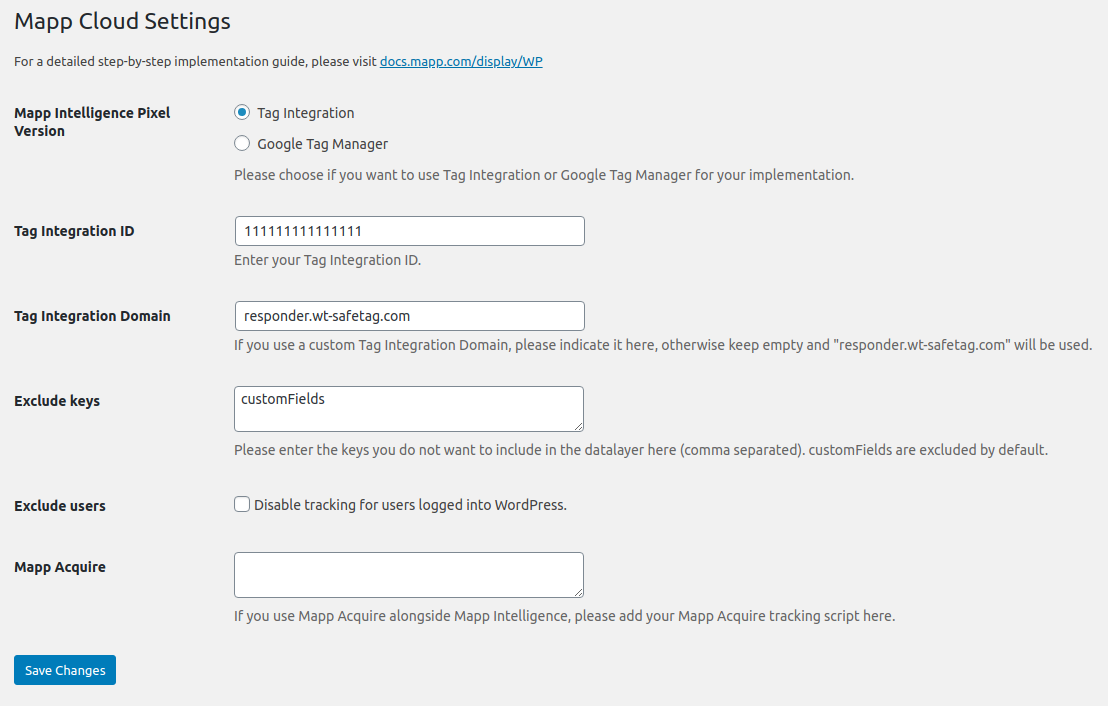
Mapp Cloud settings
Changelog
1.2.3
- Make virtual product view & add requests on catalogue pages more resilient to bad browser performance
- Update Smart Pixel to 6.6.0
1.2.2
- Add WP filter “mapp_datalayer_before_create”
1.2.1
- Hotfix admin menu
= 1.2.0=
* Update Smart Pixel to 6.5.1
* Remove support for Mapp Acquire
= 1.1.9=
* Hotfix
= 1.1.8=
* Update Smart Pixel to version 6.3.8
* Faster loading of Smart Pixel
* Support for German in settings menu
* New internal code structure
= 1.1.7=
* fix pixel statistic version
= 1.1.6=
* update Smart Pixel to version 6.3.7
= 1.1.5=
* update Smart Pixel to version 6.3.4
= 1.1.4=
* update Smart Pixel to version 6.2.6
1.1.3
- update Smart Pixel to version 6.2.4
- rename plugin name to Mapp Cloud Integration
- add Mapp Acquire
1.1.2
- update Smart Pixel to version 6.2.3
1.1.1
- fix Smart Pixel not loading when no GTM ID is set
1.1.0
- add GTM support
- Woocommerce: add taxonomies entry to products in datalayer
- Woocommerce: fix quantity error when adding product on archive page
1.0.2
- fix setting page bundle
1.0.1
- fix links in readme.txt
1.0
- Initial Revision